Lives up here ↑ in your menu bar
Your Mac, a keystroke away.
Clipboard history, snippets, tasks, sticky notes, window snapping and more — one menu-bar app that keeps your day in reach.
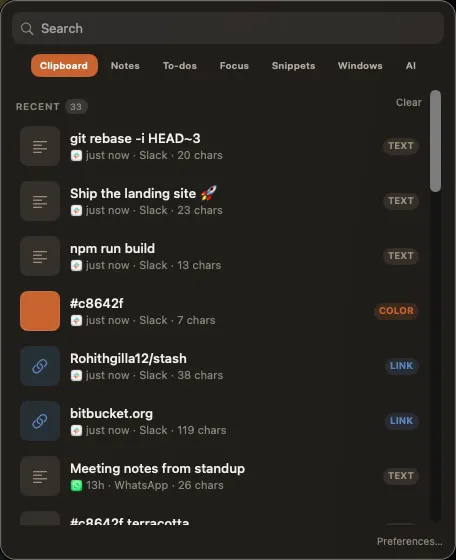
Clipboard
Everything you copied, instantly back.
Searchable history with link previews, image clips and QR codes. Hit a number to paste — ⌘1–9.
⌃⌥V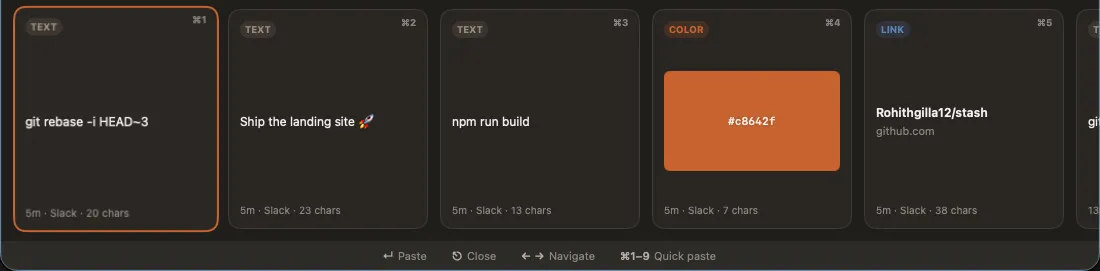
Snippets
Type less, everywhere.
Text-expansion triggers fire system-wide, with dynamic placeholders like {date}, {clipboard} and fill-in fields.
:trigger
Tasks
Plans in plain English.
Type "pay rent fri 9am !high" and Stash sets the date, time and priority. Recurring tasks and due reminders included.
Sticky notes
Notes that stay in sight.
Drop sticky notes on your desktop or jot in the notes window — all persisted.
⌃⌥S Windows
Snap without the mouse.
Keyboard-driven window tiling powered by Accessibility — halves, corners, fullscreen.
Focus
A timer in your menu bar.
Pomodoro sessions that count down right where you can see them.
AI & palette
Command everything with ⌘K.
A fuzzy command palette for every action, plus an AI tab to put your day in order.
⌘K Works your way
Your keys, or ours.
Global hotkeys out of the box — or skip them entirely and trigger every action with a stash:// deeplink wired into Raycast or Karabiner.
- ⌃⌥V — Paste browser
- ⌃⌥S — Sticky notes
- ⌃⌥C — Quick capture
- ⌘K — Command palette
Private by default
Your data stays on your Mac.
Everything lives in a local database on-device. Add a per-app ignore-list so Stash never captures from your password manager. No account, no sign-in, no cloud required.